AI Providers
RFlect supports three providers through a unified abstraction. Pick one (or none — AI is optional).
OpenAI
- Default provider
- Tool calling via Chat Completions (GPT-4 family) and Responses API (GPT-5 family)
- Vision via GPT-4o+
Configure — Tools → Manage API Keys → OpenAI tab, paste your key.
Or: export OPENAI_API_KEY=sk-...
Models supported: gpt-4o-mini (default), gpt-4o, gpt-5-nano, gpt-5-mini, gpt-5.2.
Anthropic
- Claude Messages API
- Tool calling and vision on all Claude models
Configure — Tools → Manage API Keys → Anthropic tab, paste your key.
Or: export ANTHROPIC_API_KEY=sk-ant-...
Models supported: Claude Sonnet (4.x family), Claude Opus.
Ollama
- Local, no API key required
- Tool calling support depends on the model (llama3.1+, qwen2.5+ work well)
- Vision via llava, llama3.2-vision, gemma3
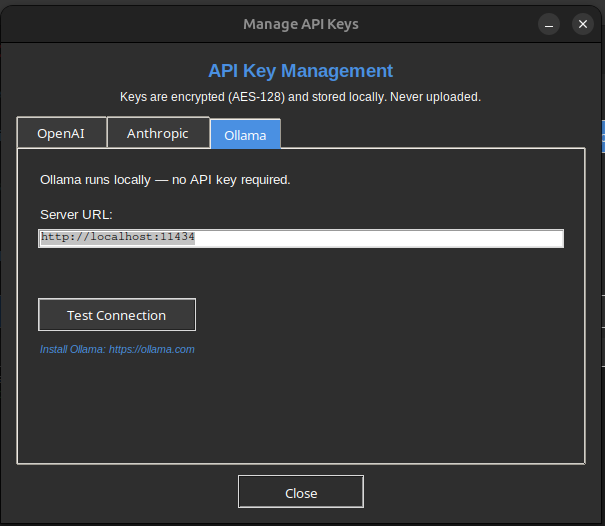
Configure — make sure ollama serve is running. No key entry needed. RFlect auto-detects the local endpoint.
Key storage
All keys are encrypted at rest:
- Fernet AES-128 with PBKDF2-HMAC-SHA256 (600 K iterations)
- Salt from the machine-ID (
/etc/machine-idon Linux,IOPlatformUUIDon macOS,MachineGuidon Windows) - Restrictive file permissions (chmod 600 / Windows ACL)
Storage priority (highest first):
- OS keyring (Windows Credential Manager / macOS Keychain / Linux Secret Service)
- Fernet-encrypted file in user config dir
- Environment variable
.envfile
Keys stay in an in-process _key_cache dict — never written to os.environ.
Switching providers
Tools → AI Settings → pick provider. Affects both the AI Chat Assistant and report generation.
See also
- AI Status — model support details, known limitations
plot_antenna/llm_provider.py— implementationplot_antenna/api_keys.py— encryption + storage